


The problem it addresses
A practice’s front desk answers the same questions by phone, books and rebooks appointments by hand, and chases missed visits one call at a time. Marketing and review requests often sit in a separate tool, if anyone has time for them.
HighLevel can take over the administrative side: a booking calendar per visit type, automatic confirmations and reminders, and a follow-up when someone misses or cancels. Clinical work stays in your clinical system, and any patient information that enters HighLevel raises the HIPAA question first.[2],[3]
Who it suits
Good fit
- Practices that want new-patient inquiries, booking requests and reminders handled in one place, using administrative information only.[2],[4]
- Practices that run their own marketing emails, local campaigns and review requests and want them in the same system as bookings.[4],[5]
- US practices prepared to buy and configure HighLevel’s HIPAA add-on, and sign its Business Associate Agreement, before any protected health information enters the platform.[1],[3]
Weaker fit
What it can help with
-
Built in
Answer new-patient inquiries
Forms, website pages and the Conversations inbox are listed core features, so web-form and text inquiries can be answered from one place with the contact’s details beside the thread.[4],[6]
Ask only for contact details, preferred times and the type of visit. Keep symptoms, diagnoses and medical history out of marketing forms and messages.
-
Built in
Take appointment requests online
Booking calendars are a listed core feature. A calendar can send email, SMS, WhatsApp and in-app notifications when an appointment is booked, cancelled or rescheduled, plus reminders and follow-ups.[2],[4]
HighLevel’s Health & Wellness playbook describes the same sequence: booked, confirmation, reminder, appointment, with follow-up for no-shows and cancellations.[3]
-
Your own setup
Follow up missed and cancelled visits
A workflow can start when a patient books online, for example to send directions or a link to forms you hold elsewhere. You can also build follow-ups that offer a new time after a missed or cancelled appointment.[3],[7]
-
Needs a connected account
Request reviews and run practice marketing
Email and SMS marketing are listed core features. Review requests can be sent by hand or from a workflow; Google review links need the Google Business Profile integration.[4],[5]
Reminders and review requests go to patients. Decide with your compliance adviser whether they need the HIPAA add-on, and what consent you need, before you automate them.
HIPAA: what the add-on covers and what stays your responsibility
- HighLevel accounts are not HIPAA compliant by default.[1]
- The HIPAA package is an optional, account-wide add-on at $297 per month. It enables encryption of ePHI, a Business Associate Agreement (BAA), audit logging and MFA enforcement. Agencies on any plan can buy it, and it cannot be deactivated once enabled.[1],[8]
- After the BAA is signed, HIPAA has to be switched on for each sub-account that needs it, and that setting cannot be turned off again.[1]
- In HighLevel’s description, the practice is the HIPAA-covered entity, and HighLevel and any agency involved are business associates. An agency must itself comply with HIPAA Title II before it can give the practice its own BAA.[1]
- Buying the add-on does not make a practice compliant. What you collect, who can see it, consent and message wording remain your responsibility; HighLevel’s playbook says to review HIPAA requirements before storing or processing protected health information.[3]
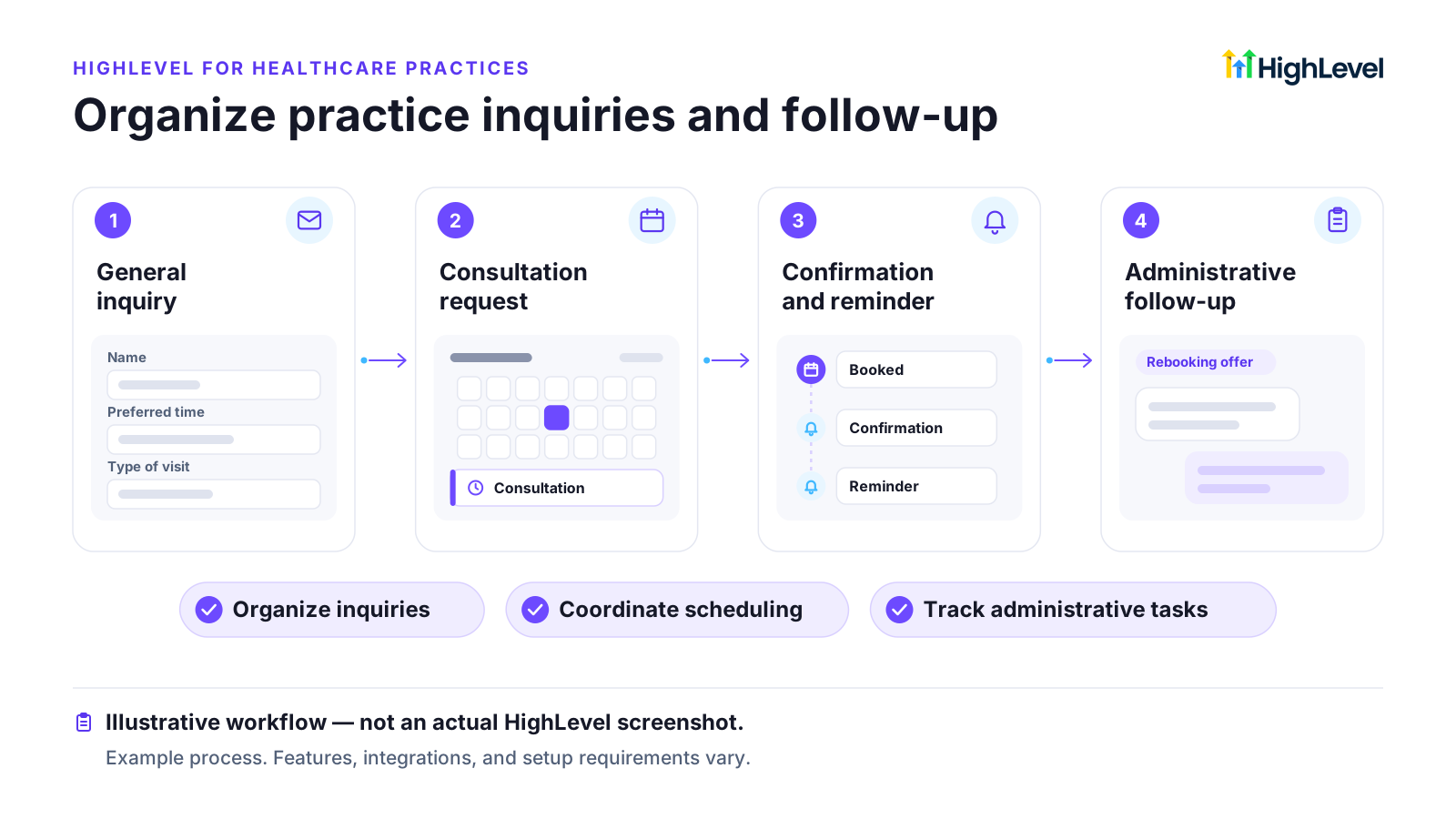
Example workflow: from inquiry to follow-up (administrative only)
Example workflow, not a documented customer result. You would build and adapt each step yourself.
-
General inquiry
A prospective patient asks a general question through the website form or chat. The form asks for name, contact details, preferred times and the type of visit, nothing clinical.[4]
-
Consultation request
The reply links to the booking calendar for that visit type, and the booking creates the appointment.[2]
Setup, costs and limits
Prices checked on HighLevel’s pricing page, as shown to a US visitor. Sources are listed at the end of the page.
- The entry plan is Starter at $97 per month. The HIPAA add-on is $297 per month on top, account-wide and permanent once enabled.[1],[8]
- Email is billed by usage at $0.675 per 1,000 emails. SMS and call rates vary by region and are not listed on the pricing page.[4],[8]
- US A2P 10DLC registration for texting can involve registration and vetting charges, recurring campaign fees and carrier messaging charges.[9]
- Calendars, notification templates, forms and workflows must be configured. A snapshot (a pre-built account from HighLevel’s library) can shorten this, but check what its forms collect.[4]
What it does not replace
- An EHR or EMR, practice management or medical billing system.
- Clinical intake or a patient portal for medical records.
- Legal or compliance advice. Decide what counts as protected health information with your adviser.
Before you sign up
- Which information you plan to put in HighLevel, and whether any of it counts as protected health information for your practice.
- Whether you need the HIPAA add-on, given that it costs $297 per month and is permanent once enabled.[8]
- How reminders and review requests will be worded, and what consent you hold for them.
- Which system stays the record for appointments, and how bookings made in HighLevel reach it.
Questions about HighLevel for healthcare
Is HighLevel HIPAA compliant?
Is HighLevel an EHR or EMR?
No. It is a CRM and marketing platform. Clinical records, charting and medical billing are not among its listed core features and belong in your clinical system.[4]
Can HighLevel send appointment reminders?
Yes. Calendars can send reminders before an appointment by email, SMS, WhatsApp or in-app notification, at times you set. Keep the wording administrative.[2]
Do I need the HIPAA add-on if I only use HighLevel for marketing?
That depends on whether protected health information will enter the platform. HighLevel’s playbook tells organisations subject to HIPAA to review its HIPAA guidance before storing or processing that information; decide with your compliance adviser.[3]
Does the HIPAA add-on matter outside the US?
HIPAA is United States law. Practices elsewhere should check the health-privacy rules in their own country.[1]
Can a marketing agency set this up for my practice?
An agency can build it, but HighLevel says the agency must itself comply with HIPAA Title II before it can sign a Business Associate Agreement with your practice. SaaSpectre does not provide setup services.[1]
Sources
Each vendor fact is matched word for word against the cited page on its check date.
-
[1]
HIPAA Compliance With HighLevel (opens in a new tab) Vendor documentation · Checked 25 October 2026 Article shows "Modified on: Thu, 11 Jun, 2026".
-
[2]
Calendar: Email, In-App, SMS & Whatsapp Appointment Notifications (opens in a new tab) Vendor documentation · Checked 25 October 2026 Article shows "Modified on: Wed, 14 Oct, 2026".
-
[3]
Industry Playbook - Health & Wellness Business (opens in a new tab) Vendor documentation · Checked 25 October 2026 Article shows "Modified on: Thu, 17 Sep, 2026".
-
[4]
HighLevel Pricing (opens in a new tab) Vendor documentation · Checked 25 October 2026
-
[5]
How to Send Review Requests (opens in a new tab) Vendor documentation · Checked 25 October 2026 Article shows "Modified on: Tue, 29 Apr, 2025".
-
[6]
Getting Started with the Conversations Tab (opens in a new tab) Vendor documentation · Checked 25 October 2026 Article shows "Modified on: Mon, 27 Jul, 2026".
-
[7]
Workflow Trigger - Customer Booked Appointment (opens in a new tab) Vendor documentation · Checked 25 October 2026 Article shows "Modified on: Mon, 6 Apr, 2026".
-
[8]
HighLevel Pricing Guide (opens in a new tab) Vendor documentation · Checked 25 October 2026 Article shows "Modified on: Sat, 22 Aug, 2026".
-
[9]
What is A2P 10 DLC: Brand and Campaign Registration (opens in a new tab) Vendor documentation · Checked 25 October 2026 Article shows "Modified on: Fri, 4 Sep, 2026".