


The problem it addresses
A coaching practice often runs on a booking tool, an email tool, a payment link, a course platform and a group chat. Each prospect has to be moved between them by hand, and nobody can see at a glance who booked a call, who was sent a proposal and who paid.
HighLevel puts those steps in one account: pages and forms, booking calendars, a pipeline, order forms through your payment provider, and courses and communities. Its pricing page lists Courses and Communities among the core features, which the entry plan includes.[1]
Who it suits
Good fit
- Coaches who sell through discovery calls and want booking, reminders and follow-up to run without manual chasing.[1],[2],[3]
- Coaches who want to host an onboarding course, a paid programme or a member community in the same account as their CRM.[1],[4],[5]
- Coaches who take payment online through Stripe or another supported provider.[4],[6]
Weaker fit
- You only need a booking link and an invoice. HighLevel takes real setup time, even starting from a pre-built snapshot.[1]
- You want a marketplace that sends you clients. HighLevel gives you your own pages, programmes and community, not an audience.
What it can help with
-
Built in
Book discovery calls and sessions
Booking calendars are a listed core feature. A calendar sends a confirmation when a call is booked, reminders before it and follow-ups after it, by email, SMS, WhatsApp or in-app notification.[1],[2]
A workflow can start when someone books through your link without your involvement, for example to send a short pre-call questionnaire.[3]
-
Built in
Offer a free resource and follow up
Funnels, landing pages, forms and email and SMS marketing are listed core features, so a free guide can be offered on a page and followed by an email sequence that invites a discovery call.[1]
-
Your own setup
Move prospects to paying clients
You name the pipeline stages, for example Resource requested, Discovery call booked, Proposal sent and Enrolled, and opportunities move through them.[7]
Existing prospects and clients can be imported in bulk from a CSV file as opportunities, with their contacts.[8]
-
Needs a connected account
Take payment for programmes
Order forms charge for the products attached to them through a connected provider: Stripe, Authorize.net, NMI, PayPal, Square or a custom provider from the marketplace. The provider’s own fees apply.[6],[9]
-
Built in
Onboard clients with a course and community
Courses can be built and sold from your account as free, one-time or recurring offers, and enrolment can be automated. Paid access needs a supported payment provider.[4]
Communities run in the Client Portal alongside Courses, with discussions, member interactions and events.[5]
Example workflow: from resource inquiry to onboarding
Example workflow, not a documented customer result. You would build and adapt each step yourself.
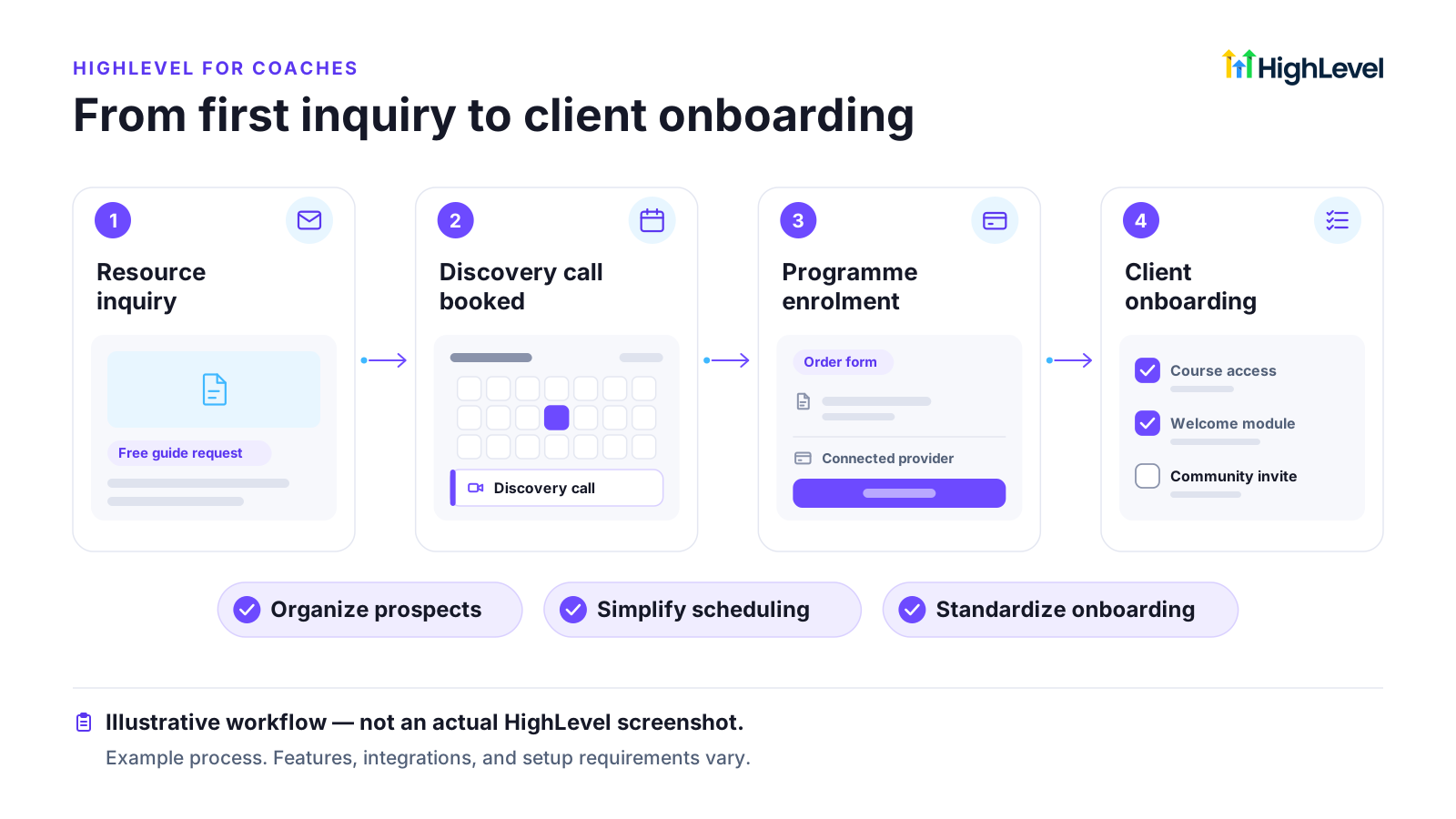
-
Resource inquiry
A visitor requests a free guide on a landing page. The form creates a contact, and a workflow emails the guide.[1]
Setup, costs and limits
Prices checked on HighLevel’s pricing page, as shown to a US visitor. Sources are listed at the end of the page.
- The entry plan is Starter at $97 per month. Its plan card lists all core features, and the pricing page’s core-feature list includes Courses and Communities. See the HighLevel pricing breakdown for what higher plans add.[1]
- Email is billed by usage at $0.675 per 1,000 emails. Texts and calls are billed by usage too, and US texting needs A2P 10DLC registration, which can carry registration and campaign fees.[1],[10]
- Paid programmes and courses need a connected payment provider, whose own fees apply.[4],[6]
- Expect to build pages, calendars, workflows and the course yourself, or start from a snapshot and adapt it.[1]
What it does not replace
- Your coaching method, content and results. No software guarantees clients or revenue.
- Accounting and tax software.
- Clinical, therapy or health services that handle health information. Check the health-privacy rules that apply before using any CRM for them.
Before you sign up
- Whether your payment provider is supported where you and your clients are.[6]
- Which programmes you will sell as free, one-time or recurring offers.[4]
- Whether you will move existing clients, courses and community members, and how long that takes.[8]
- Who builds and maintains the funnels and automations: you, a contractor or an agency.
Questions about HighLevel for coaches
Which HighLevel plan does a coach need?
The pricing page lists Courses and Communities among the core features, and the Starter plan card lists all core features. Usage charges and your payment provider’s fees come on top.[1]
Can clients book discovery calls and get reminders automatically?
Can I sell courses or memberships in HighLevel?
Yes. Courses can be offered free, as a one-time purchase or on a recurring basis, and delivered through the Client Portal. Paid access needs a connected payment provider.[4]
Which payment providers can I use?
Order forms can take payments through Stripe, Authorize.net, NMI, PayPal, Square or a custom provider from the marketplace. Check that your provider works in your country.[6]
Will HighLevel bring me more coaching clients?
No software can promise that. HighLevel can organise how you capture, follow up and onboard the people your own marketing brings in.
Sources
Each vendor fact is matched word for word against the cited page on its check date.
-
[1]
HighLevel Pricing (opens in a new tab) Vendor documentation · Checked 25 October 2026
-
[2]
Calendar: Email, In-App, SMS & Whatsapp Appointment Notifications (opens in a new tab) Vendor documentation · Checked 25 October 2026 Article shows "Modified on: Wed, 14 Oct, 2026".
-
[3]
Workflow Trigger - Customer Booked Appointment (opens in a new tab) Vendor documentation · Checked 25 October 2026 Article shows "Modified on: Mon, 6 Apr, 2026".
-
[4]
How To Build Courses / Membership Sites (opens in a new tab) Vendor documentation · Checked 25 October 2026 Article shows "Modified on: Sat, 19 Sep, 2026".
-
[5]
Communities New Experience in Unified Client Portal and GoKollab (opens in a new tab) Vendor documentation · Checked 25 October 2026 Article shows "Modified on: Thu, 15 Oct, 2026".
-
[6]
Selling products on order forms with available payment providers (opens in a new tab) Vendor documentation · Checked 25 October 2026 Article shows "Modified on: Mon, 24 Feb, 2025".
-
[7]
Getting Started - Setup Pipelines and Opportunities (opens in a new tab) Vendor documentation · Checked 25 October 2026 Article shows "Modified on: Mon, 24 Aug, 2026".
-
[8]
Importing Opportunities using a CSV file (opens in a new tab) Vendor documentation · Checked 25 October 2026 Article shows "Modified on: Thu, 17 Sep, 2026".
-
[9]
Add a One-Step Order Form to a Funnel in HighLevel (opens in a new tab) Vendor documentation · Checked 25 October 2026 Article shows "Modified on: Fri, 11 Sep, 2026".
-
[10]
What is A2P 10 DLC: Brand and Campaign Registration (opens in a new tab) Vendor documentation · Checked 25 October 2026 Article shows "Modified on: Fri, 4 Sep, 2026".